How Do I Safely Connect Multiple Devices To A Portable Power Station?
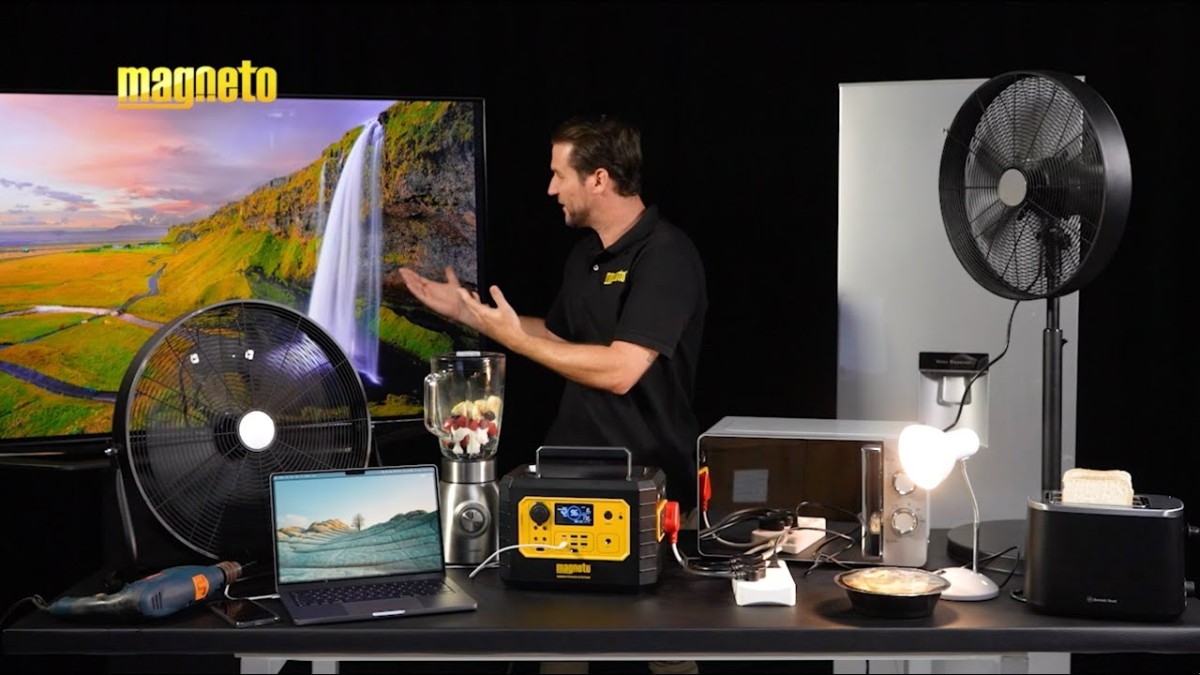
So you’ve got a portable power station and now you’re wondering how to safely connect multiple devices to it?
Well, you’re in the right place!
In this article, we’ll explore some practical tips and guidelines that will help you efficiently power up all your gadgets without any worries.
Whether you’re planning a camping trip or need a backup power source for your outdoor activities, we’ve got you covered.
So let’s dive right in and make sure you’re all set to enjoy uninterrupted power wherever you go!
[embedyt] https://www.youtube.com/watch?v=_PNqMUkzVvU[/embedyt]Understanding the Power Capacity of the Portable Power Station
When it comes to how to safely connect multiple devices to a portable power station, it is crucial to understand the power capacity of the station itself.
The maximum power output of the power station is an important factor to consider.
This information can typically be found in the specifications provided by the manufacturer.
Knowing the maximum power output will allow you to determine how many devices can be safely connected.
Check the maximum power output of the portable power station
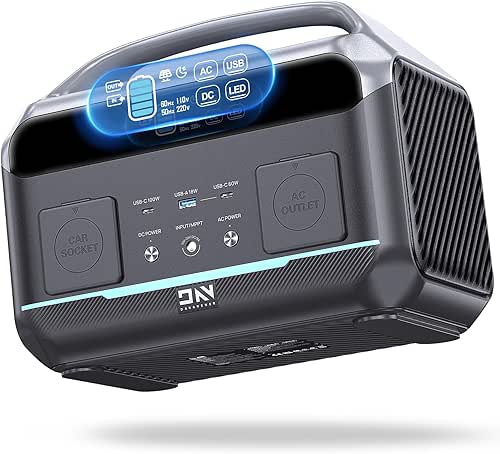

Before connecting any devices, it is essential to check the maximum power output of the portable power station.
This information is usually indicated in watts (W) or volt-amps (VA).
It represents the total amount of power that the station can supply at any given time.
Exceeding the maximum power capacity of the power station can lead to overloading, which may result in damage to the station or connected devices.
Identify the power requirements of your devices
To ensure safe and efficient operation, it is important to identify the power requirements of your devices.
This includes understanding the wattage or voltage required by each device.
This information can usually be found on the device itself or in the user manual.
Knowing the power requirements will enable you to choose the appropriate power station and ensure that it can meet the needs of your devices.
Calculate the total power consumption of all connected devices
Once you have identified the power requirements of your devices, it is crucial to calculate the total power consumption of all the connected devices.
This will help you determine if the power station can handle the combined load of all the devices.
Simply add up the wattage or voltage requirements of each device to obtain the total power consumption.
It is important to ensure that the total power consumption does not exceed the maximum power capacity of the power station to safely connect multiple devices
Connecting Devices with Appropriate Cables and Adapters
Once you have determined the power capacity of the power station and the power requirements of your devices, it is time to connect them using appropriate cables and adapters.
To do this safely and effectively, there are a few important steps to follow.
Identify the type of ports available on the portable power station
First and foremost, you need to identify the type of ports available on the portable power station.
This will determine the kind of cables and adapters you will need to connect your devices.
Common port types include USB, AC outlets, and DC outlets.
Ensure that you have the necessary cables and adapters for each port type.
Choose the right cables and adapters for each device to Safely Connect Multiple Devices
Once you have identified the port types, it is essential to choose the right cables and adapters for each device.
Make sure that the cables and adapters are compatible with both the device and the power station.
For example, if your device requires a USB connection, ensure that you have a USB cable that is compatible with both the device and the power station.

Consider using surge protectors or power strips for added safety
To further protect your devices and the power station from power surges or electrical issues, it is advisable to use surge protectors or power strips.
These devices can help prevent damage to your equipment and provide an extra layer of safety.
Make sure that the surge protector or power strip is compatible with the power station and that it has sufficient capacity to handle the total power consumption of all connected devices.
Managing the Load and Charging Process
To ensure optimal performance and safety of your devices and the power station, it is important to manage the load and charging process effectively.
By following these steps, you can distribute the load evenly, prioritize essential devices, and monitor the charging status.
Distribute the load evenly among different ports
One of the key factors in managing the load is to distribute it evenly among the different ports available on the power station.
This helps to prevent overloading of any single port and ensures that each port operates within its intended capacity.
By evenly distributing the load, you can optimize the charging process and maximize the efficiency of the power station and safely connect multiple devices.
Prioritize essential devices for uninterrupted power supply
When connecting multiple devices to a portable power station, it is important to prioritize essential devices.
This ensures that critical devices, such as medical equipment or communication devices, receive uninterrupted power supply.
By prioritizing these devices, you can ensure their functionality even during a power outage or when other devices are using the power station.
Monitor the charging status and adjust the load if necessary
Throughout the charging process, it is important to monitor the charging status of the devices connected to the power station.
This can be done by checking the battery indicators or using the built-in monitoring features if available.
If you notice that certain devices are charging slowly or that the power station is struggling to meet the load, it may be necessary to adjust the load by disconnecting or reorganizing devices.
Using Voltage Converters and Transformers
In situations where devices with different voltage requirements need to be connected to a portable power station, voltage converters and transformers can be used to ensure compatibility and safety.
Check the voltage requirements of your devices
Before connecting any devices to the power station, it is crucial to check the voltage requirements of each device.
Some devices may operate on standard household voltage, while others may require a different voltage level.
This information can usually be found on the device or in the user manual.
Checking the voltage requirements will help you determine if you need voltage converters or transformers.
Use voltage converters when connecting devices with different voltage standards
If you have devices that operate on different voltage standards than the portable power station, voltage converters can be used to bridge the gap to safely connect multiple devices.
Voltage converters convert the voltage from one level to another, allowing devices with different voltage requirements to be safely connected.
Make sure to choose a voltage converter that is compatible with both the device and the power station.

Use transformers for devices that require a different frequency
In addition to voltage differences, some devices may also operate on a different frequency than the power station.
Transformers can be used to convert the frequency of the power supply, ensuring compatibility with devices that require a different frequency.
It is important to choose a transformer that matches the voltage and frequency requirements of the device.
Safety Precautions and Best Practices to Safely Connect Multiple Devices
When connecting multiple devices to a portable power station, it is essential to prioritize safety and follow best practices to prevent any accidents or damage.
Avoid exceeding the maximum power capacity of the power station
One of the most crucial safety precautions is to avoid exceeding the maximum power capacity of the power station.
This can lead to overloading, overheating, and potentially damage to the power station or connected devices.
Always check the power requirements of your devices and ensure that the total power consumption does not exceed the maximum power capacity of the power station to safely connect multiple devices.
Keep the power station and connected devices in a well-ventilated area
To prevent overheating of the power station and connected devices, it is important to keep them in a well-ventilated area.
Adequate airflow helps dissipate heat and ensures that the devices operate within a safe temperature range.
Avoid placing the power station in enclosed spaces or covering it with objects that may restrict airflow.
Avoid exposing the power station to extreme temperatures or water
Portable power stations are designed to operate within specific temperature ranges.
It is important to avoid exposing the power station to extreme temperatures, as this can affect its performance and lifespan.
Additionally, it is crucial to keep the power station away from water or any liquids to prevent electrical hazards and damage to the equipment.
Proper Cable Management and Organization
To ensure a clean and organized setup when connecting multiple devices to a portable power station, proper cable management and organization are essential.
Avoid tangled cables and organize them neatly
Tangled cables can not only be unsightly but also pose potential safety hazards.
To avoid tangles and confusion, it is important to organize the cables neatly to safely connect multiple devices.
Use cable clips, cable ties, or cord clips to secure the cables and prevent them from tangling or getting in the way.
This will not only make the setup look more organized but also help with troubleshooting and maintenance.
Label cables for easy identification
When dealing with multiple devices and cables, it can be challenging to trace which cable goes where.
To make things easier, consider labeling the cables.
You can use cable tags, colored tape, or even simple sticky notes to label each cable with its corresponding device.
This will save you time and effort in the long run and ensure efficient cable management.
Use cable ties or cord clips to secure cables
Securing cables is not only about preventing tangles but also about ensuring the safety of the setup.
Loose or dangling cables can be tripping hazards or get accidentally pulled, causing damage to the connected devices or the power station itself.
Use cable ties or cord clips to secure cables to walls, furniture, or other surfaces, keeping them out of the way and minimizing the risk of accidents.
Considerations for Different Types of Devices
Different types of devices have specific considerations when connecting them to a portable power station.
Here are some tips for connecting laptops and computers, mobile phones and tablets, as well as electric appliances and tools.
Laptops and Computers
When connecting laptops and computers to a portable power station, it is important to consider the power requirements of these devices.
Laptops typically have specific power adapters, so make sure to use the appropriate cable or adapter to connect them to the power station.
For desktop computers, use surge protectors or power strips to protect the sensitive components from power surges.
Mobile Phones and Tablets
Mobile phones and tablets are commonly charged via USB cables.
Make sure to choose USB cables and adapters that are compatible with both the devices and the power station.
It is also a good idea to use surge protectors or power strips to protect these devices from potential power surges.
Electric Appliances and Tools
When connecting electric appliances and tools to a portable power station, ensure that the power station has suitable AC outlets or ports for these devices.
Check the power requirements of the specific appliance or tool and make sure it is within the capacity of the power station.
Additionally, it is important to use surge protectors or power strips to safely connect multiple devices.
Charging Multiple Devices Simultaneously
Many portable power stations offer the convenience of charging multiple devices simultaneously.
However, it is important to do so safely and efficiently.
Check if the power station supports simultaneous charging to Safely Connect Multiple Devices
Before connecting multiple devices, check if the power station supports simultaneous charging.
Some power stations may have limitations on the number of devices that can be charged simultaneously.
It is important to follow the manufacturer’s guidelines and not exceed the recommended number of devices.
Ensure each device receives sufficient power
When charging multiple devices simultaneously, it is important to ensure that each device receives sufficient power.
Distribute the load evenly among the available ports and prioritize essential devices.
If you notice that any device is not receiving sufficient power, consider disconnecting or reorganizing the devices to optimize the charging process.
Avoid overloading the power station
Charging multiple devices simultaneously may put a significant load on the power station.
To avoid overloading, ensure that the total power consumption of all connected devices does not exceed the maximum power capacity of the power station.
If necessary, prioritize devices or consider charging them in separate sessions to avoid straining the power station.
Monitoring Battery Health and Capacity
To maintain the longevity and performance of the portable power station, monitoring the battery health and capacity is important.
Be aware of the power station’s battery lifespan and capacity
Every portable power station has a limited battery lifespan and capacity.
It is important to be aware of these specifications to ensure that you are utilizing the power station effectively.
Avoid draining the battery completely as much as possible to prolong its lifespan and consider charging the power station regularly to maintain its capacity.
Avoid draining the battery completely
Repeatedly draining the battery completely can shorten its lifespan and affect its overall capacity.
To avoid this, consider recharging the power station before it reaches a critically low level.
By maintaining a sufficient charge level, you can prolong the battery’s longevity and ensure that the power station is always ready to power your devices when needed.
Consider using a battery monitor to track usage
Using a battery monitor can provide valuable insights into the usage and charging patterns of the power station.
These monitors can help you understand the rate at which the battery is being drained and can provide estimates of how much time is left before the battery is depleted.
By monitoring the battery usage, you can make informed decisions about when to recharge the power station and optimize its performance and safely connect multiple devices.
Properly Disconnecting and Storing Devices
When you’re done using the portable power station and need to disconnect and store your devices, it is important to do so properly to ensure the safety of the equipment.
Power off and unplug devices before disconnecting
Before disconnecting any devices, it is crucial to power them off and unplug them from the power station.
This helps prevent any potential electrical hazards or damage to the devices.
Powering off and unplugging ensures a clean disconnect and minimizes the risk of power surges when removing the cables from the power station.
Store cables and devices in a safe and organized manner
To prolong the lifespan of your devices and cables, it is important to store them properly after use.
Store cables in a neat and organized manner to prevent tangling or damage.
Keep devices in a safe and secure location, away from any potential hazards or extreme temperatures.
Storing devices and cables in an organized manner not only protects them but also makes it easier to set up and use them in the future.
Avoid any strain on the cables when storing
When storing devices and cables, make sure to avoid any strain or tension on the cables.
Twisting or bending cables excessively can lead to fraying or damage to the wires.
Keep the cables in a relaxed and natural position to prevent any strain that could compromise their integrity.
Taking care of the cables during storage will ensure their longevity and prevent any potential issues when using them next time.
By following these guidelines and best practices, you can safely connect multiple devices to a portable power station.
Understanding the power capacity, choosing the appropriate cables and adapters, managing the load, and following proper safety precautions will help you make the most of your portable power station and ensure the smooth operation of your devices in various situations.
Whether you’re camping, traveling, or experiencing a power outage, a portable power station can be a reliable and convenient solution to keep your devices powered.